
![PQ-Logo-Primary-Lockup-TM-1.png]](https://coachsupport.positiveintelligence.com/hs-fs/hubfs/Logos/PQ-Logo-Primary-Lockup-TM-1.png?height=50&name=PQ-Logo-Primary-Lockup-TM-1.png)
Coach Dashboard Updates
In Coach Dashboard version 2.5.3, we’re introducing updates that give coaches more visibility into client progress, more control over feedback collection, and an easier way to share Saboteur Assessment links when email delivery gets in the way.
These updates include more detailed module progress tracking, improved feedback collection settings, and a new way to copy a lead’s Saboteur Assessment link when email delivery is not enough.
View detailed module progress across your clients
You can now view client progress across Foundations, Applications, and Business modules in one centralized Module Progress page.
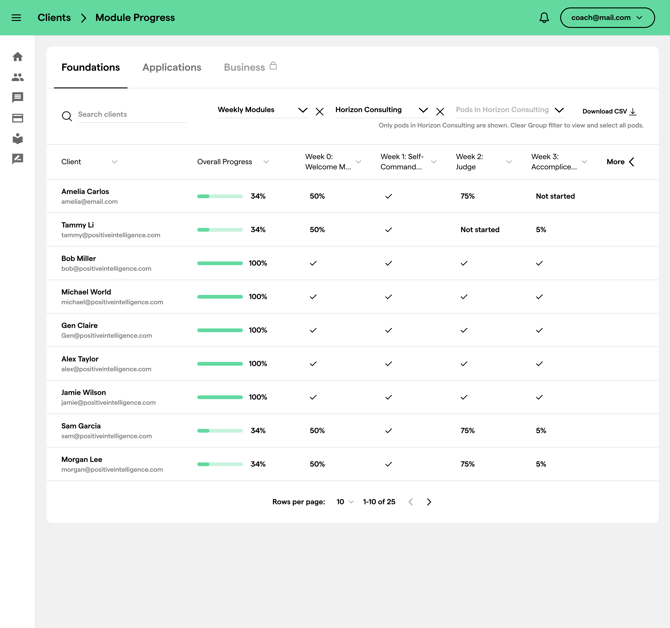
From the Clients page, select View Module Progress to see how your clients are progressing through their available modules. This gives you a clearer way to identify who is moving forward, who may be stuck, and where additional support may be needed.

On the Module Progress page, you can:
- View module progress by client
- Switch between Foundations, Applications, and Business tabs
- Search clients by name or email
- Filter by group or pod, when available
- See overall progress percentages
- View completion status for individual modules
- Download progress data as a CSV
This makes it easier to assess progress across your client base without needing to click into each client individually.
Manage client feedback collection settings
We’ve updated the Client Feedback page to give you clearer visibility into feedback collection status and, for Coach Pros, more control over how feedback is collected.

The overview section shows whether feedback collection is currently enabled or disabled.
Coach Pros can manage feedback collection settings, including whether feedback collection is enabled and when clients are prompted to submit feedback. Timing options include:
- 4 weeks, recommended
- 5 weeks
- 6 weeks
- 7 weeks
When feedback collection is disabled, clients will not see the feedback survey in the PQ App. Any feedback responses already submitted will remain visible in the dashboard, so past insights are not lost.
For non-coach pro members, feedback collection remains enabled by default.
We’ve also improved the Feedback Summary layout with a clearer rating display, star rating visuals, and expandable top values and top issues so you can review client sentiment more easily.
Copy a lead’s Saboteur Assessment link
If a lead cannot find their Saboteur Assessment invitation email, you can now copy their unique assessment link directly from the Leads page.
For pending leads, you’ll see a new copy icon next to the resend invitation option. You can also access Copy assessment link from the row actions menu.

Each assessment link is unique to the invited lead and works the same way as the link included in the invitation email. Once the lead completes the assessment, the link is no longer valid and their status will update from pending to completed.
This gives you another way to help leads complete their assessment when email delivery gets in the way.
Why these updates matter
Together, these updates are designed to help you spend less time chasing information and more time coaching.
You now have:
- A clearer view of client learning progress
- More control over feedback collection
- A faster way to help leads access their Saboteur Assessment
These improvements make it easier to manage your coaching relationships directly from Coach Dashboard.
Thank you for being part of our coaching community. Keep an eye on this section of the Support site for the latest enhancements — exciting updates are coming soon!